
An Overview of Florlist.com
The free platform that helps flower farmers sell directly to florists
NOTE: I am not affiliated with Florlist in any way. I just love it and think more flower farmers should know about it!
If you're a flower grower selling wholesale to florists, or a florist looking to source local flowers, Florlist could be a game changer for you.
Florlist is an online ordering platform built specifically for the cut flower industry. Rather than relying on spreadsheets, price lists, emails and text messages, it gives growers their own online shop where florists can browse availability, place orders, and communicate with their growers all in one place. It's simple to use, FREE, and continually evolving based on feedback from growers and florists.
In July 2026, Florlist did a huge overhaul and updated the platform based on feedback, and the new features have made it even more useful for both growers and florists.
How does Florlist work?
Each grower has their own online storefront where they can list the flowers they have available each week, set prices, and manage inventory. Each shop gets its own unique URL and growers can choose to add a password for florists to access their shop or leave it open for anyone with the link to view. From the dashboard, growers can see their weekly Cut List once orders have come in, message florists directly within the platform to keep communication all in one place, list their predicted availability for florists to pre-order up to 12 weeks in advance, view analytics, and loads more.
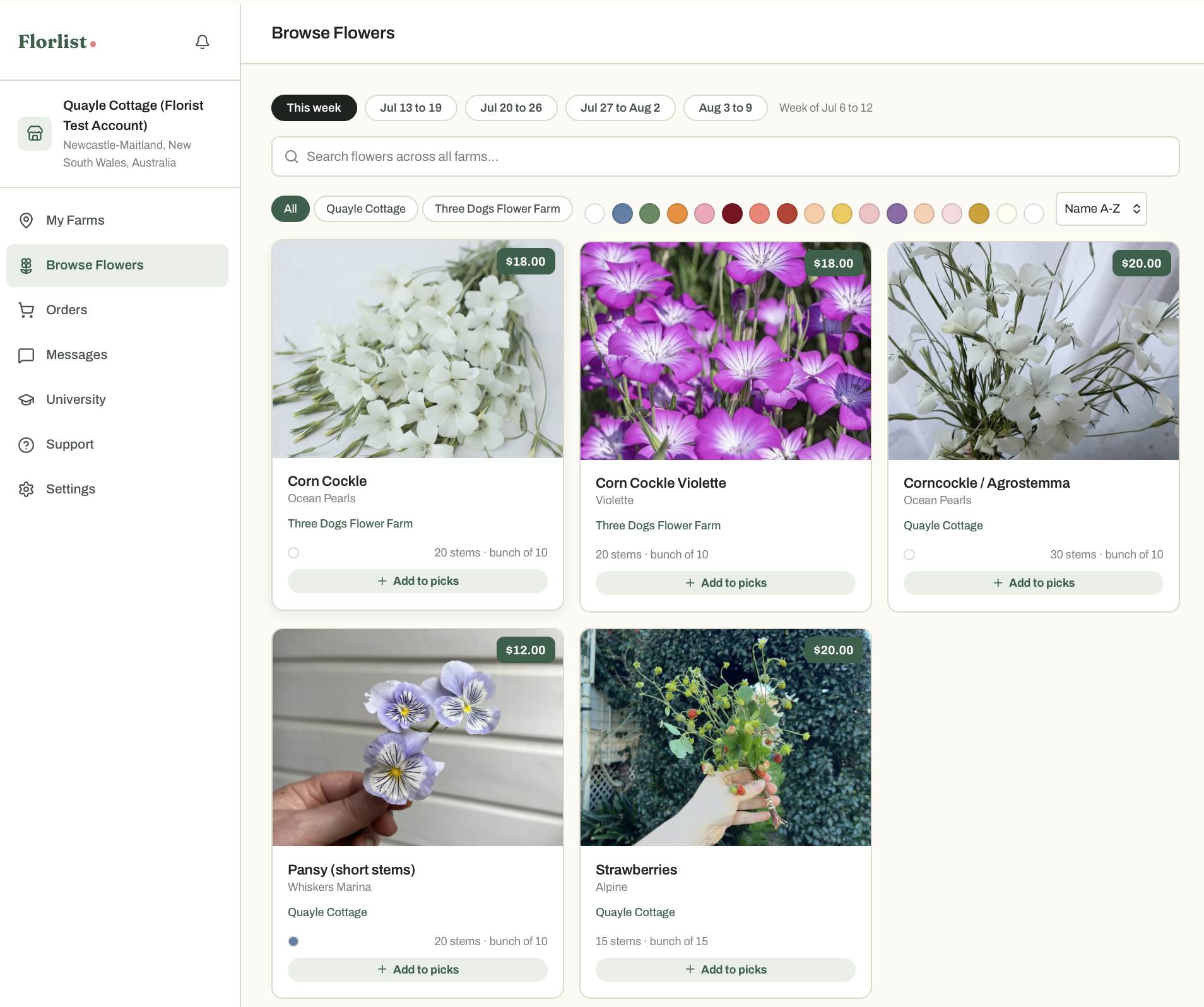
Florists set up their own account and request access to follow the growers they'd like to purchase from. Once approved, they can then browse the availability of each of the growers individually or all of them in one combined view. They can fill one basket across all of the farms and the checkout will walk them through farm by farm. No payment is taken at checkout; they are order requests only. Growers can choose to link Stripe and accept payments once they confirm the order requests, or take payments separately.
What's new?
Better shop management
Growers now have more control over how their shop operates, including the ability to:
set products to automatically change to Available Soon or Not Available when stock levels reach zero,
add multiple pickup and delivery options with collection times and notes for florists to choose from at check out,
temporarily Close Shop while harvesting or completing deliveries so that orders can’t be placed after you have already picked, and
customise the appearance of their storefront.
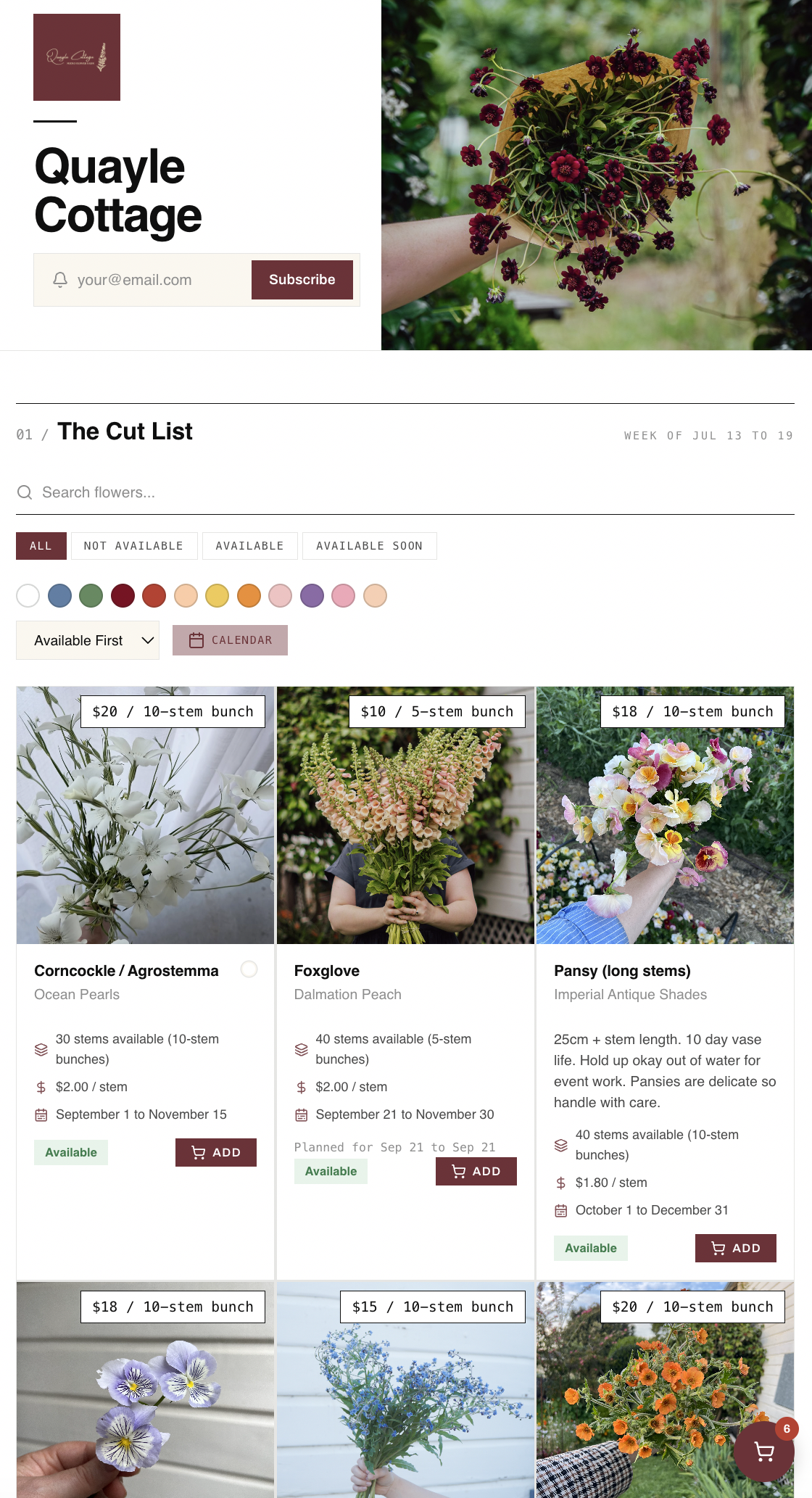
Faster inventory management
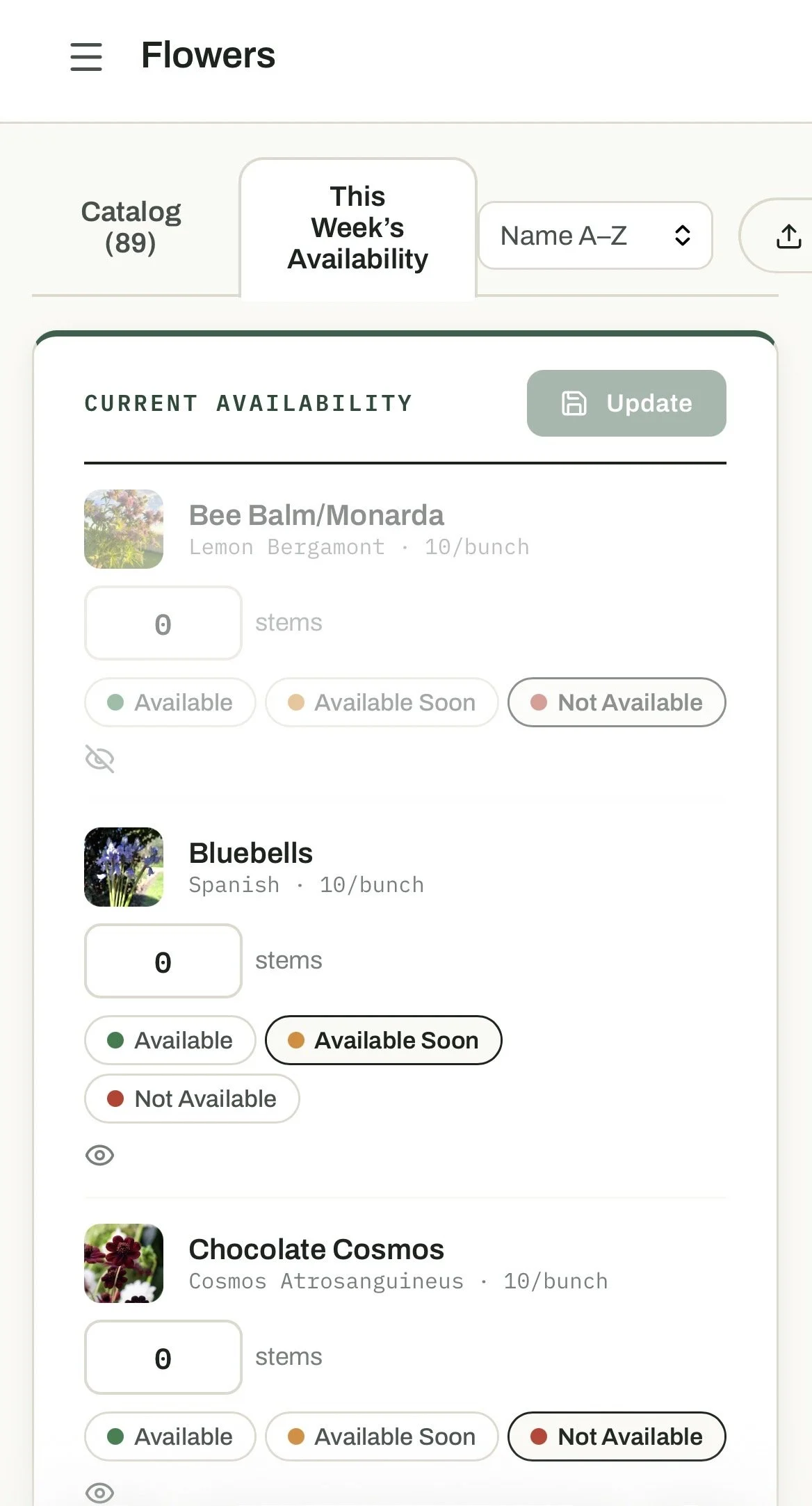
Updating availability has become much quicker, and the mobile version is so much more user-friendly!
Instead of opening every product individually, growers can now update stock levels for all flowers from one page and update them all at once from the tab in the Flowers page called This Week’s Availability. The flower catalog has been redesigned as well, making it a lot easier to navigate.
There's also a new Cut List that combines every order into a single harvest list that you can check off as you go.
Communication in one place
Growers can now message florists directly from the platform or vice versa, using one of two methods. You can send a general message from the Messages tab or you can click on their order and message them from there so it links to that specific order. If quantities change, orders can now be edited from within the platform as well.
Florists also receive automatic email notifications when:
an order has been submitted,
the grower confirms it, and
the order is ready for collection or delivery.
Growers can set a weekly availability email to go out automatically every Monday morning (unless nothing is in stock), or you can trigger the email manually from the subscriber page. You could also choose to send an email separately with a link to your shop.
Pre-orders
Growers can now choose to let their florists pre-order up to 12 weeks in advance. You can turn on Order Ahead in Page Settings and then add your expected dates and quantities in the Planner page. These products will need to have the availability status set to Available or Available Soon. If the product is set to Not Available, florlists will only be able to view the predicted availability on the Calendar page and won’t be able to add them to a pre-order cart.
This makes it easier for florists to plan weddings, events and seasonal work well ahead of time while giving growers an idea of future income.
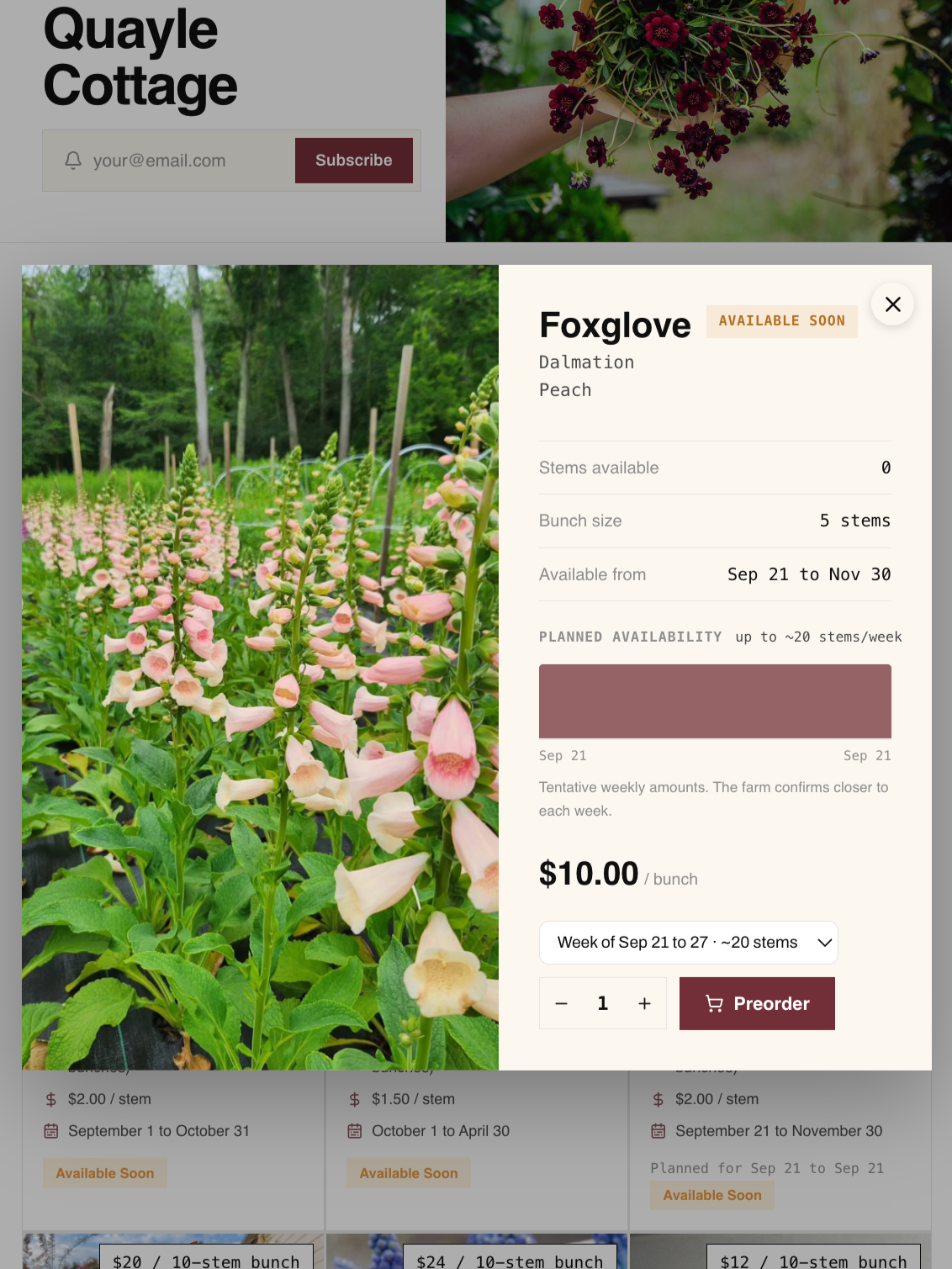
Add the dates you expect to have a product available up to 12 weeks in advance so that florists can choose the week and pre-order.
New features for florists
One of the biggest additions is florist accounts.
Florists can now:
view their complete order history,
track the status of every order,
message growers,
follow/request access to their favourite flower farms,
see all of those growers' availability in one place or view the shop fronts individually, and
discover new growers using an interactive farm map.
For farms with a public profile, following connects florists instantly. Farms with a password need to approve an access requests which will give the florist permanent access unless it’s revoked by the grower.
The florist shopping experience has also been improved, with flowers that are currently available now appearing first by default on the individual shop fronts. No more filtering or scrolling through a huge list!
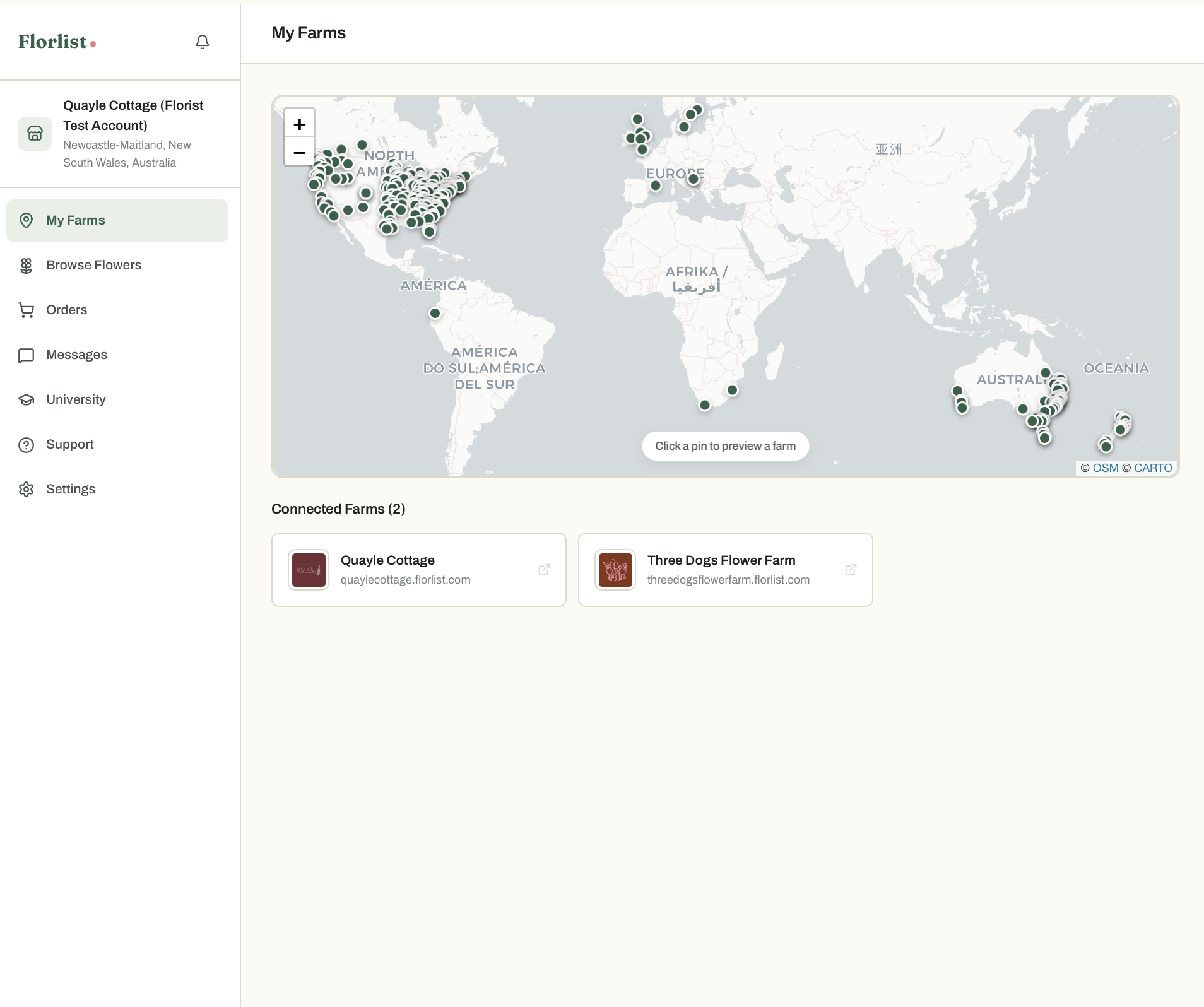
This is the view from the florist account page. Florists can click on the individual farms to view their shop page or go to Browse Flowers to see a combined view of all available products from their connected farms.
Other improvements
Other notable additions include:
Stripe integration for automated payments after an order is confirmed.
A significantly improved mobile experience.
Featured product tags such as New Arrival, On Sale, Pick of the Week and Last Chance.
A Market Prices tool that provides pricing benchmarks to use as a rough guide based on data from Florlist growers around the world.
Is Florlist worth using?
Yes! I always thought Florlist was a useful tool but since the update, it is next level. If you're a grower looking for an easier way to manage inventory, wanting to move away from sending weekly availability spreadsheets or juggling orders across multiple platforms, Florlist is such a great solution. And it’s free!
For florists, it provides a simple way to browse availability from multiple growers, place orders online and keep track of everything in one place.
What I particularly love is that the creator of Florlist, Noah, continues to improve the platform in response to feedback.
If you're curious, it's well worth having a look around and seeing whether it could simplify your workflow this season. Check it out at florlist.com.
NOTE: I am not affiliated with Florlist in any way. I just love it and think more flower farmers should know about it!
